
Hello World
Welcome back to Day 2 of our ChatGPT Beginner Course! Yesterday, we learned what ChatGPT is and why it’s such a powerful AI tool. Today, we’re diving into exactly how to set up and use ChatGPT so you can start chatting confidently right away!
Step 1: Sign Up and Log In
Getting started with ChatGPT is incredibly easy. Follow these quick steps:
- Visit the ChatGPT website at chat.openai.com.
- Click on “Sign Up” if you’re new, or “Log In” if you already have an account.
- Enter your email address and choose a secure password. You can also sign up quickly using your Google or Microsoft account.
- Verify your email address by checking your inbox for a confirmation email.
- You’re all set!
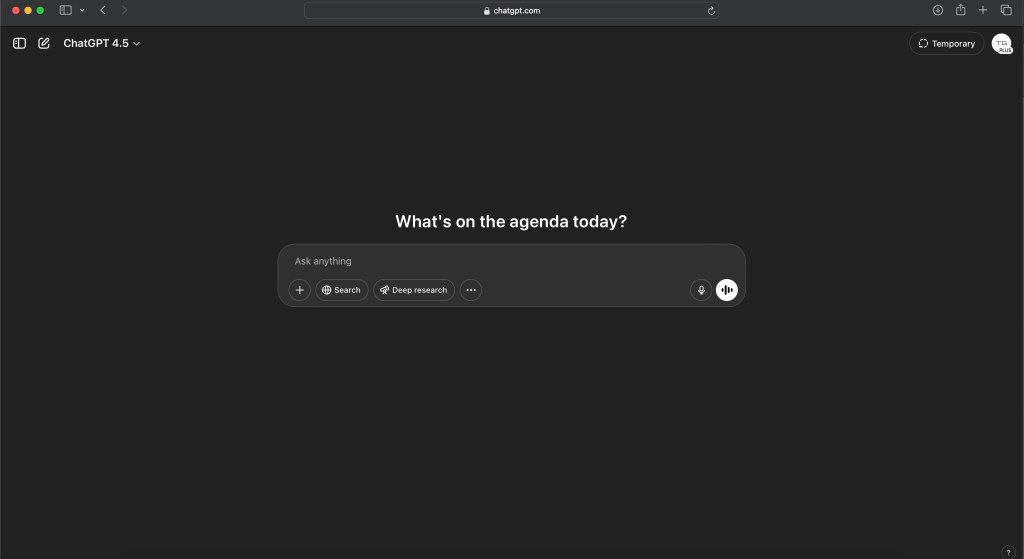
Step 2: Understanding the Chat Interface
Once logged in, you’ll see a clean and simple chat interface:
- Text Input Box: Located at the bottom, this is where you’ll type your prompts or questions.
- Chat History: Your previous conversations are displayed in the main window, allowing easy review.
- New Chat Button: At the top left, click here to start a fresh conversation anytime.
Show Image
Step 3: Start Your First Conversation
Ready to chat? Here’s how:
- Type your question or request clearly into the text box. Keep it simple at first. For example:
- “Help me schedule my day” or
- “Can you write a short poem about cats?”
- Press Enter or click the Send button to get ChatGPT’s response.
And that’s it—you’ve officially started chatting with ChatGPT!
Tips for Better Conversations
To get the best responses from ChatGPT, consider these helpful tips:
- Be Specific: Clearly phrase your questions to get precise answers.
- Provide Context: If your query is complex, add some background information.
- Experiment: Try different types of questions, from factual inquiries to creative tasks.
- Use Simple Language: ChatGPT understands natural language, so keep it conversational!
What Can You Do Next?
ChatGPT can help you in numerous ways:
- Answer questions on a huge variety of topics
- Assist in drafting emails, articles, or creative stories
- Simplify difficult concepts and topics
- Generate ideas for projects or content
The possibilities are nearly endless!
Today’s Quick Practice
Ready to test your skills? Here are two easy prompts to try now:
- Ask ChatGPT to explain a simple concept: “Explain photosynthesis like I’m five years old.”
- Request creative content: “Write a funny short story about a robot learning to cook.”
Enjoy experimenting and discovering the capabilities of ChatGPT!
What’s Coming Tomorrow?
Tomorrow we’ll discuss pricing and plans, answering the important question: “Is ChatGPT Free to Use?” We’ll explain everything you need to know about accessing and maximizing the value of ChatGPT without breaking the bank.
Happy chatting, and see you tomorrow!
Next Lesson: Day 3: Is ChatGPT Free to Use? (Pricing and plans explained)
 AI Fundamentals
Leave a comment